
Comparing filings means putting two or more submissions side by side to answer a specific question: is this rate change larger than typical, does this insurer's approach differ from a competitor's, has this state seen more filing activity than another. The value of a comparison depends entirely on choosing the right benchmark and the right fields to line up.
This is a general methodology for comparison, useful whether you are comparing across companies, states, time periods or products, since the underlying approach is the same in each case.
serff.ai is built to do that for you: it indexes millions of SERFF filings and lets you ask questions in plain English instead of opening documents one by one. You can connect it to the AI assistant you already use: Claude or ChatGPT, via the serff.ai MCP server, or work directly in the web platform.
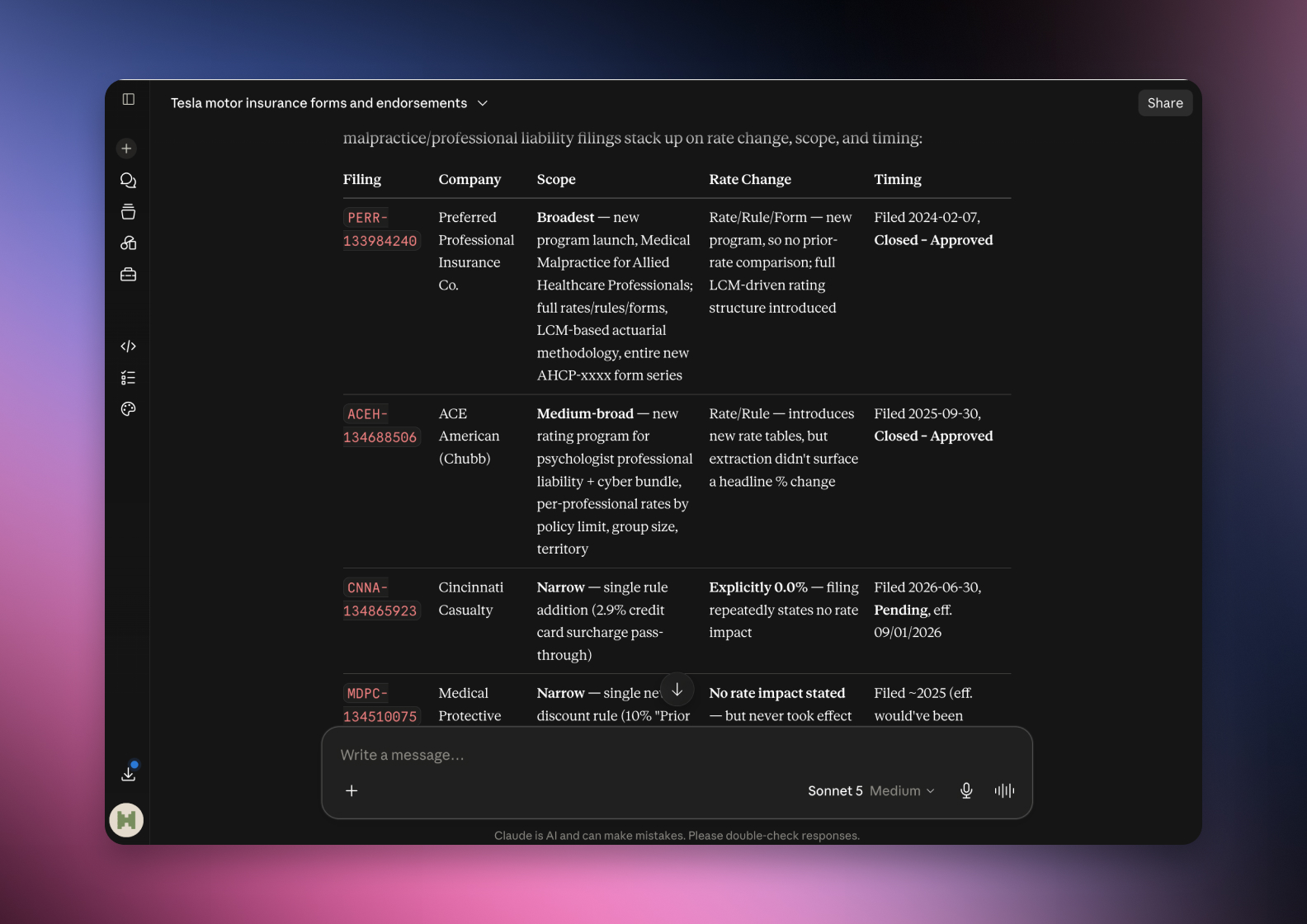

Connected via MCP to the AI you already use, Claude or ChatGPT, or through our dedicated platform, serff.ai makes searching and analysing SERFF filings effortless. A comparison becomes a single question: ask how these filings differ, or which stands out, and get a grounded, cited answer in seconds.
The manual way
Read each filing fully before you can compare them.
With serff.ai, just ask
“Compare these filings on rate change, scope and timing.”
The manual way
Decide which fields are actually comparable by hand.
With serff.ai, just ask
“Which of these filings are directly comparable, and why?”
The manual way
Normalise figures across filings of different sizes.
With serff.ai, just ask
“Which filing had the largest rate change relative to its scope?”
The manual way
Spot the outlier in a set of similar filings.
With serff.ai, just ask
“Which of these filings stands out from the rest, and how?”
Every answer is cited back to the exact page of the source PDF and grounded only in filed values, with no invented numbers, so you can trust it the way this audience needs to. Research that took weeks takes a prompt.
No credit card required. Simply sign up and connect to Claude or ChatGPT or use Swallow’s SERFF.ai platform.
A comparison is only as good as what it's compared against. Before reading anything, decide what the relevant benchmark is: the same company's prior filings, a competitor's filing for the same product, or the broader market for that product line. The wrong benchmark produces a technically accurate but misleading comparison.
Two filings can look similar on the surface and differ substantially underneath: different rating factors touched, different effective populations, or a different review regime entirely. Confirm the comparison is actually apples to apples before drawing a conclusion from it.
When comparing rate changes across companies, check whether each is a standalone rate filing or a combined rate/rule/form submission. A combined filing's headline number can include effects a standalone rate filing wouldn't.
Once the fields are lined up, the comparison itself is usually straightforward: what differs, and by how much. The harder part is judgment, deciding whether a difference is meaningful or within normal variation, which is easier once you've built a sense of the typical range for that product and state.
A single comparison between two filings can be misleading if either one is unusual for reasons unrelated to what you're studying. Where possible, compare against several filings, not just one, to get a sense of the normal range.
Comparing filings starts with choosing the right benchmark, then lining up rate change, scope, timing and reasoning on a like-for-like basis. Confirm the filings are genuinely comparable before drawing conclusions, and use more than one comparison point where you can.
Choosing the right benchmark, whether that's the same company's prior filings, a competitor's filing, or the broader market for that product.
Rate change, scope, timing and the reasoning cited in the actuarial memorandum are the core fields worth lining up.
Check whether they cover the same scope, review regime and filing type; a combined filing's headline figure can include effects a standalone one wouldn't.
A single comparison can be misleading if the other filing is unusual for unrelated reasons; comparing against several gives a sense of the normal range.
Yes, but confirm the review regime and scope match, since state-level differences can affect what a rate change actually represents.





 ChatGPT
 Claude
.png)
.png)
.png)