
Researching a company's filing history means more than searching one name. Most insurers write business under several legal entities within a group, and a search limited to the parent company name alone can miss a large share of what that group has actually filed.
This is how to build a genuinely complete company-level view: which entities to search, how to work across states, and what a full filing history for one insurer actually looks like.
serff.ai is built to do that for you: it indexes millions of SERFF filings and lets you ask questions in plain English instead of opening documents one by one. You can connect it to the AI assistant you already use: Claude or ChatGPT, via the serff.ai MCP server, or work directly in the web platform.
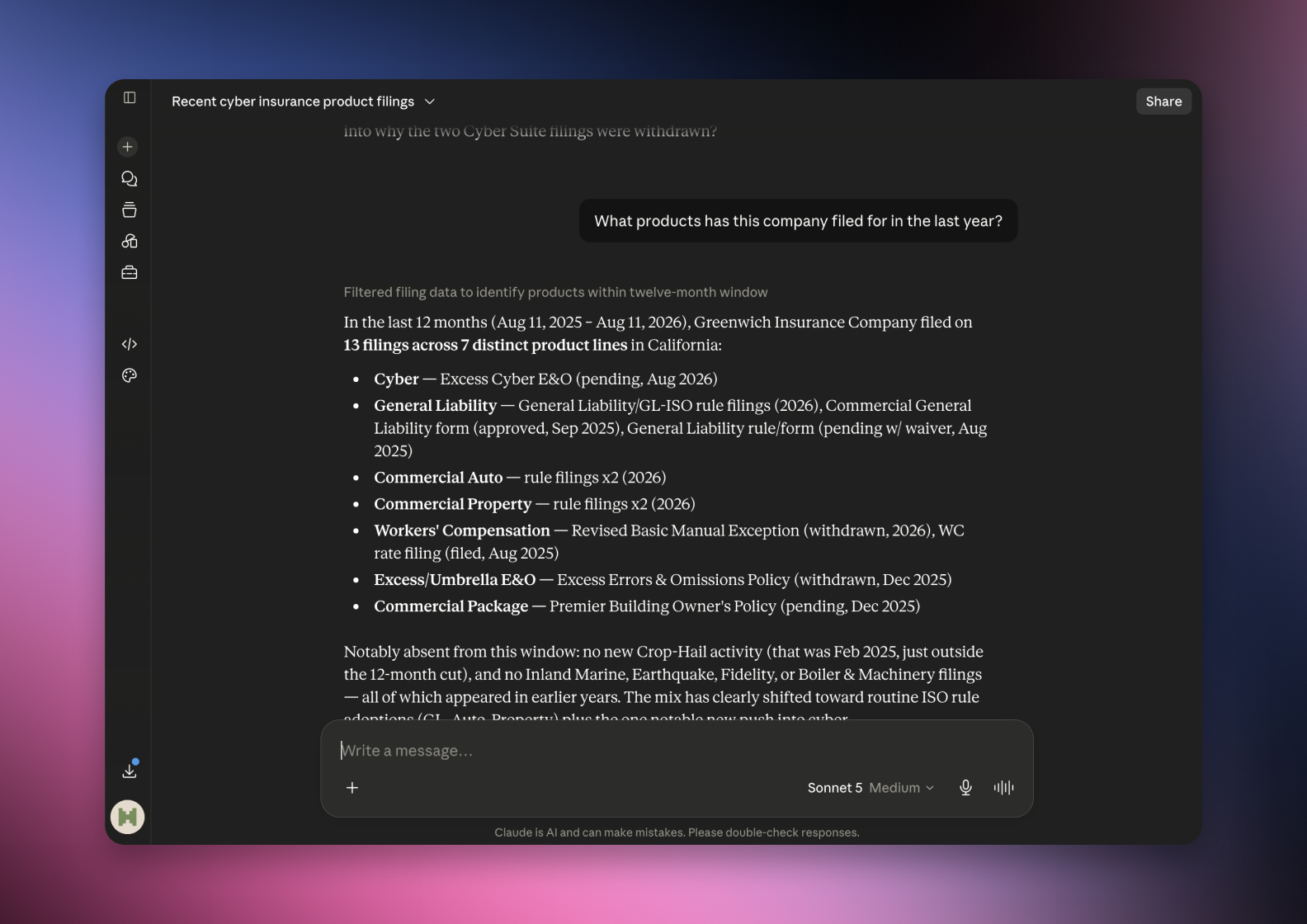

Connected via MCP to the AI you already use, Claude or ChatGPT, or through our dedicated platform, serff.ai makes searching and analysing SERFF filings effortless. Company research becomes a single question: ask for a company's full filing history, including its subsidiaries, and get a grounded, cited answer in seconds.
The manual way
Search each subsidiary name separately to cover a group.
With serff.ai, just ask
“Show every filing from this company and its subsidiaries.”
The manual way
Manually track which states an insurer is active in.
With serff.ai, just ask
“Which states has this company filed in recently?”
The manual way
Piece together a company's product mix from scattered filings.
With serff.ai, just ask
“What products has this company filed for in the last year?”
The manual way
Compare filing activity between two competing insurers by hand.
With serff.ai, just ask
“How does this company's filing activity compare to a competitor's?”
Every answer is cited back to the exact page of the source PDF and grounded only in filed values, with no invented numbers, so you can trust it the way this audience needs to. Research that took weeks takes a prompt.
No credit card required. Simply sign up and connect to Claude or ChatGPT or use Swallow’s SERFF.ai platform.
Most large insurers operate through multiple legal entities under one group. A search for just the parent company name can miss filings submitted under a subsidiary's own legal name, even though the underlying business decisions were made centrally.
A single company's activity is rarely confined to one state. Building a full picture means repeating the company search across every state where the insurer operates, since SERFF Filing Access does not offer one unified cross-state view.
If you're unsure which subsidiaries belong to a group, a quick search for the parent name often surfaces related entity names in the results themselves. Note them down and search each one individually.
Once you have the relevant entities and states, group the results by filing type and date to see patterns: which products are seeing rate activity, which states are most active, and how frequently the company is filing overall. This is also the foundation for comparing one insurer against another.
A company that appears inactive in a state search may simply not be licensed there, or may write that state's business under a different subsidiary entirely. Don't read a gap as certainty until you've checked both possibilities.
A complete company-level filing view means searching every entity in a group, not just the parent name, and repeating that search across every state the company operates in. Group the results by type and date to see the real pattern of activity.
Identify every legal entity within the group and search each one individually, since a parent-name search alone can miss subsidiary filings.
SERFF Filing Access typically requires searching state by state, so a full company view means repeating the search across each relevant state.
A search on the parent name often surfaces related entities in the results; NAIC company codes can also help confirm you have the right entity.
The entity searched may not be licensed in that state, or the business may be written under a different subsidiary within the group.
Group results by filing type and date across every relevant entity and state to see patterns in product mix, state focus and filing frequency.





 ChatGPT
 Claude
.png)
.png)
.png)
.png)