
Researching filings by product type means finding every submission for a specific line of business, personal auto, homeowners, or a niche commercial coverage, across companies rather than starting from a company you already know. The classification system that makes this possible is Type of Insurance and Sub-Type of Insurance, usually shortened to TOI and Sub-TOI.
This is how to use that classification to find every relevant filing for a product line, and how to avoid the gaps that come from inconsistent categorisation.
serff.ai is built to do that for you: it indexes millions of SERFF filings and lets you ask questions in plain English instead of opening documents one by one. You can connect it to the AI assistant you already use: Claude or ChatGPT, via the serff.ai MCP server, or work directly in the web platform.
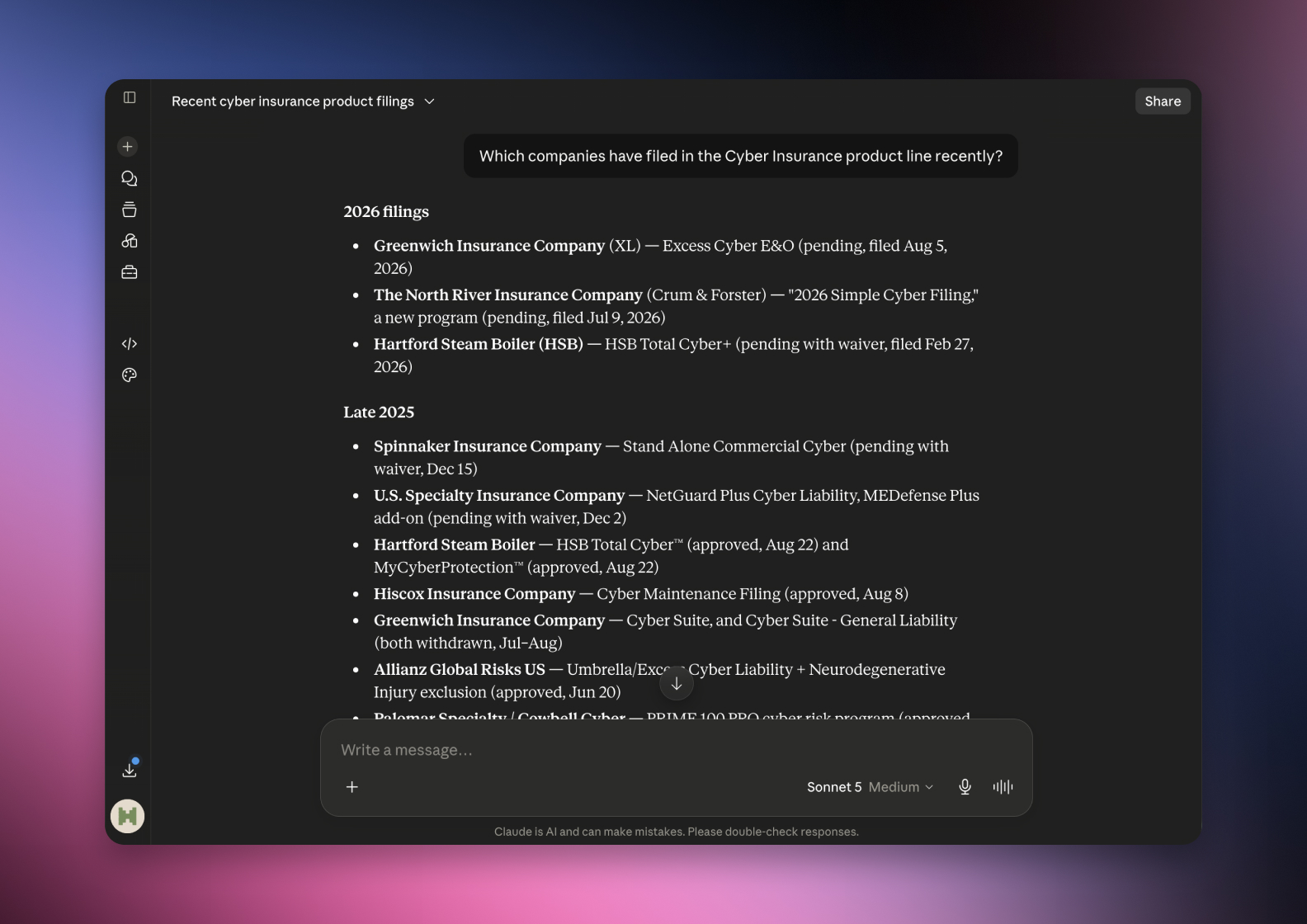

Connected via MCP to the AI you already use, Claude or ChatGPT, or through our dedicated platform, serff.ai makes searching and analysing SERFF filings effortless. Product research becomes a single question: ask for every filing in a line of business over a period, and get a grounded, cited answer in seconds.
The manual way
Learn each state's TOI and Sub-TOI codes before searching.
With serff.ai, just ask
“Find every filing in this product line over the last year.”
The manual way
Search company by company for activity in one product line.
With serff.ai, just ask
“Which companies have filed in this product line recently?”
The manual way
Catch inconsistently classified filings by manual review.
With serff.ai, just ask
“Are there any filings in this area that might be miscategorised?”
The manual way
Track how many filings a product line sees per quarter.
With serff.ai, just ask
“How much filing activity has this product line seen recently?”
Every answer is cited back to the exact page of the source PDF and grounded only in filed values, with no invented numbers, so you can trust it the way this audience needs to. Research that took weeks takes a prompt.
No credit card required. Simply sign up and connect to Claude or ChatGPT or use Swallow’s SERFF.ai platform.
Type of Insurance is the top-level product classification, personal auto or homeowners, for example, and Sub-Type narrows it further, such as a specific homeowners form or an auto endorsement category. Nearly every SERFF filing carries both fields, making them the standard way to search by product rather than by company.
Filter by TOI and Sub-TOI, then narrow by state and date the same way you would for a company search. This surfaces every insurer active in that line, not just the ones you already had in mind, which is particularly useful for market monitoring work.
If a product line spans several plausible Sub-TOI categories, search the broader TOI alone first and skim results before committing to a narrower Sub-TOI filter that might exclude a relevant filing.
Not every filing is categorised with perfect consistency, especially for niche or emerging product lines that don't map cleanly onto existing TOI categories. A filing can be classified slightly differently than you'd expect, particularly for newer or hybrid coverages.
Relying on TOI and Sub-TOI alone can miss a filing that was categorised loosely or inconsistently. If you suspect a gap, pair the classification search with a keyword search for the product name as a cross-check.
TOI and Sub-TOI are the standard way to search by product line across companies rather than starting from a company name. Search broad first if a product line spans multiple Sub-TOI categories, and cross-check with a keyword search when classification consistency is a concern.
TOI (Type of Insurance) is the top-level product classification, and Sub-TOI narrows it further; together they are the standard way filings are categorised by product.
Filter by TOI and Sub-TOI, then narrow by state and date to see every company's activity in that line, not just companies you already know.
Classification isn't always perfectly consistent, especially for niche or emerging product lines, so a filing can be categorised differently than expected.
Search the broader TOI first if a product line could span multiple Sub-TOI categories, then narrow once you've confirmed the classification pattern.
Pair the TOI and Sub-TOI filter with a keyword search for the product name to catch any inconsistently classified filings.





 ChatGPT
 Claude
.png)
.png)
.png)
.png)