
Filing disposition is the regulator's final decision on a filing, and the record of it. It is the answer to the question every reader ultimately wants: was this approved, and if so, in what form? The disposition closes the review and tells you what the insurer is actually allowed to use.
Because a requested change and an approved change are often different, the disposition is where you learn what really reached the market. Reading it means checking not just the overall outcome but the status of each individual item in the filing.
serff.ai is built to do that for you: it indexes millions of SERFF filings and lets you ask questions in plain English instead of opening documents one by one. You can connect it to the AI assistant you already use: Claude or ChatGPT, via the serff.ai MCP server, or work directly in the web platform.
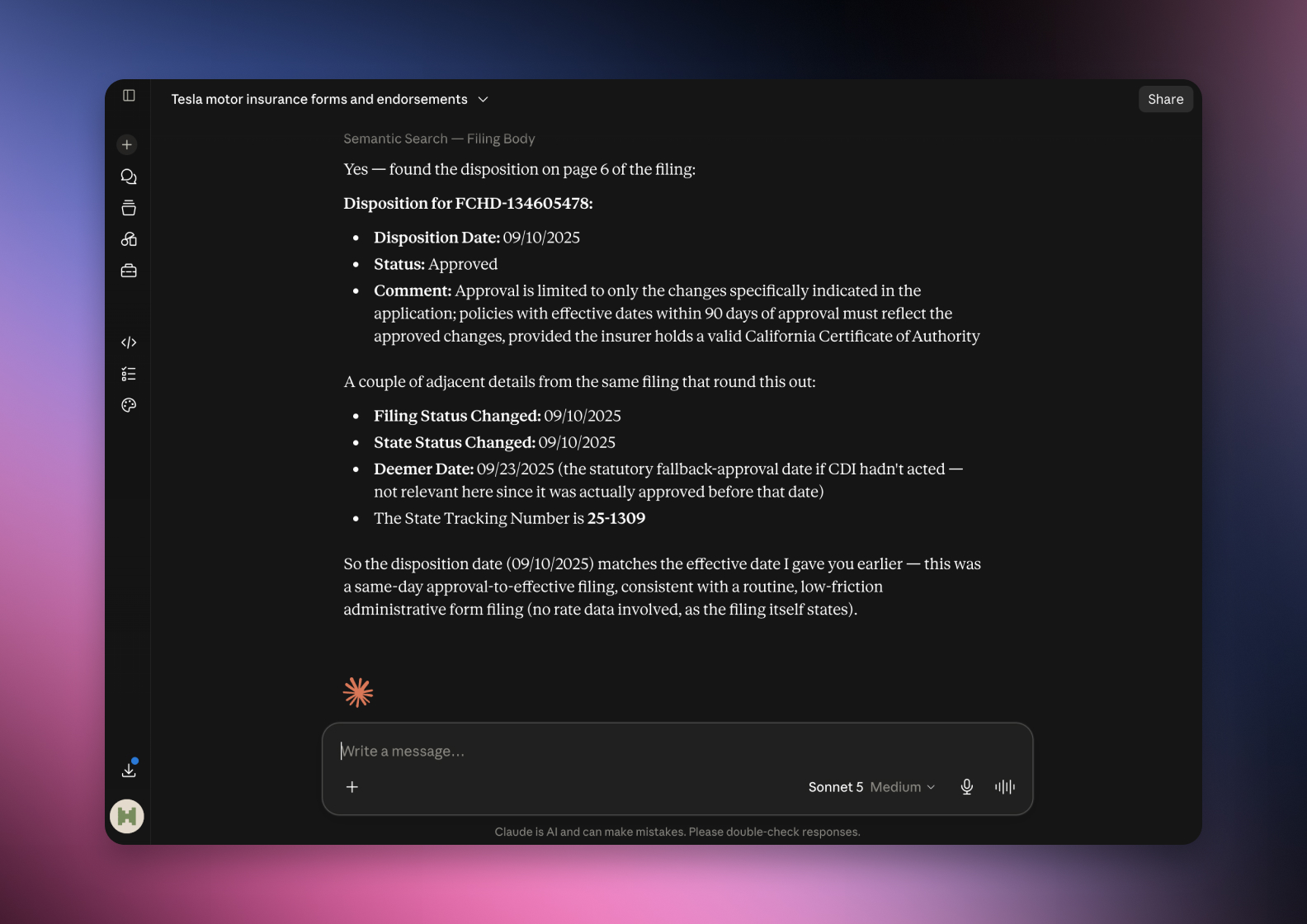

Connected via MCP to the AI you already use, Claude or ChatGPT, or through our dedicated platform, serff.ai makes searching and analysing SERFF filings effortless. The disposition becomes a single question: ask whether a filing was approved, what the approved change was, or which items were accepted, and get a grounded, cited answer in seconds.
The manual way
Open the disposition report to find the final decision.
With serff.ai, just ask
“Was this filing approved, and in what form?”
The manual way
Compare the approved figure against what was requested.
With serff.ai, just ask
“How does the approved change compare to the request?”
The manual way
Check the status of each schedule item one by one.
With serff.ai, just ask
“Which items in this filing were approved?”
The manual way
Find the effective date the change actually takes hold.
With serff.ai, just ask
“What is the effective date of the approved change?”
Every answer is cited back to the exact page of the source PDF and grounded only in filed values, with no invented numbers, so you can trust it the way this audience needs to. Research that took weeks takes a prompt.
No credit card required. Simply sign up and connect to Claude or ChatGPT or use Swallow’s SERFF.ai platform.
A disposition resolves to one of a handful of statuses. The exact labels vary by state, but the meanings are consistent.
Where the outcome sits in the wider journey is covered in what happens after a filing is submitted.
The disposition is more than a single status. The report usually lists the outcome of each schedule item, so you can see not just whether the filing was approved overall but which specific rate pages or forms were accepted, and it records the approved figures and the effective date.
Read the disposition report item by item, not just the headline status. A filing can be approved overall while a specific form or rate page is excluded, and that detail is exactly what a competitor analysis needs.
The disposition is where you compare what the insurer asked for against what it got. The gap between the requested rate change and the approved one is often the product of the objection thread, and it is the number that actually reached policyholders.
Approved is not the same as in force. A filing can be approved with a future effective date, so check the effective date to know when the change actually applies.
Start with the overall status, then read the item-level report, then note the approved figures and the effective date. Finally, compare against the request to see what the review changed.
Filing disposition is the regulator's final decision and the record of it. Read it item by item, not just as a headline status, and compare the approved figures against the request to see what actually reached the market and when.
It is the regulator's final decision on a filing, and the record of that decision, including the outcome for each item and the approved figures.
Common outcomes include approved, filed, approved with conditions, withdrawn and disapproved, though exact labels vary by state.
Approved usually means the regulator formally reviewed and accepted the filing; filed means it was accepted under a file-and-use or informational process without formal approval.
It appears in the disposition section of the filing, often as a report listing the status of each schedule item along with the effective date.
Not necessarily. A filing can be approved with a future effective date, so check that date to know when the change applies.






 ChatGPT
 Claude
.png)
.png)
.png)
.png)